


PointCare
3.528.00 Reviews
App Specs
- Version
- 26.9.1
- Updated On
- License
- Free
- Downloads
- 10,000+
- Developer
- Homecare Homebase, LLC
- Categories
- Medical
- Platform
- Android
Screenshots
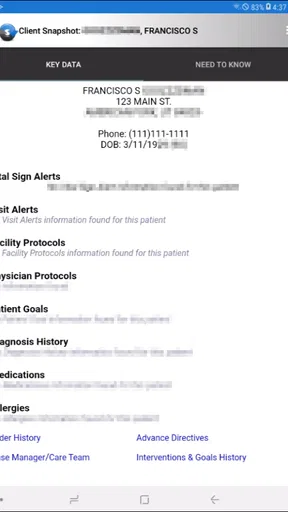
 Analysis by AppCompare
PointCare is a focused medical app rather than a general health tool. I see its value in a very specific setting: authorized users who need to work with clinical visit information connected to the HCHB EMR. That narrow purpose is also the key to understanding it. If you are part of a home-health workflow that already uses HCHB, PointCare can make field documentation feel more direct. If you are simply looking for a personal symptom tracker, appointment organizer, or medication reminder, this is not the app I would choose.
My overall impression is that PointCare works best as a practical companion to an established clinical system, not as a standalone medical application. Its store summary describes access to clinical visit data for authorized HCHB users, and that wording matters. The app is built around an existing professional relationship and workflow. It is not trying to replace a patient portal or become an all-purpose health dashboard.
How PointCare fits into real clinical work
In everyday use, the most important question is not whether the app has a long list of consumer-friendly tools. The important question is whether it helps the right person reach the right visit information at the right point in a care routine. A clinician moving between visits may need a mobile way to review relevant details instead of relying on a desktop workstation. That is the kind of situation where PointCare makes sense.
Imagine a home-health professional preparing for a visit. The useful part is not entertainment or customization; it is having a mobile connection to the clinical visit record within the HCHB environment. The professional can approach the visit with the relevant information already available through the authorized workflow, then use the app as part of the broader documentation process. I would treat it as one working surface in a larger system, rather than assuming it independently manages the entire episode of care.
That distinction is one of the app’s strongest qualities. PointCare does not appear aimed at casual browsing. Its purpose is tightly tied to clinical visits, which can make it more useful than a generic notes app for staff who already depend on HCHB. A general note-taking tool might be easier to install, but it would not provide the same connection to an organization’s clinical record. On the other hand, someone without that organizational access would have little reason to install it.
The developer behind the app is Homecare Homebase, LLC, which places PointCare within a recognizable home-care software context. I appreciate that the product’s identity is fairly clear: it is for authorized HCHB EMR users, not a consumer wellness product pretending to serve every kind of medical need. That clarity helps set expectations before installation.
What I found useful about the focused design
The first practical strength is concentration. Instead of filling the screen with general health content, PointCare centers its role on clinical visit data. For a professional, that can reduce the temptation to treat the app as a second, disconnected record system. The more a mobile tool stays aligned with the source EMR, the less likely it is to become an isolated place where information is viewed but not meaningfully connected to the official workflow.
Worth Reading Before You Choose

EA SPORTS FC Mobile 26 Is a Bigger Football Game, but It Takes Time

Flipboard Shows What News Apps Must Do Beyond the Feed

Switching to Android Auto Means Rethinking Your Driving Routine

Google Calendar Makes a Crowded Week Easier to Manage

Ludo King Makes the Most of the Minutes Between Plans

Baby Panda World Brings Quick Play to Modern Phones, but Its Game Library Feels Busy
A second strength is mobility. Home-health work does not happen entirely at a desk, so a mobile app has an obvious advantage over a desktop-only routine. PointCare’s usefulness comes from bringing access closer to the visit itself. That can help when a worker needs to check information before moving on to the next task, especially in a schedule where returning to a central computer is inconvenient.
A less obvious benefit is that the app may encourage better separation between personal and professional tools. I would not want clinical visit details scattered across ordinary phone notes, email drafts, or messaging apps. Using a purpose-built application connected to the HCHB environment is a more sensible habit than copying sensitive information into whatever app happens to be convenient. PointCare’s focused role supports that disciplined workflow, even though the app should still be used according to the organization’s own procedures.
There is also a useful trade-off in its restricted audience. The authorization requirement is a barrier for outsiders, but it is appropriate for clinical information. A broad-access app would be easier to explore, yet much less suitable for protected professional records. In this case, limited access is not automatically a flaw; it is part of the product’s purpose.
Where the experience can become frustrating
The same narrow design that makes PointCare relevant to HCHB users also makes it a poor fit for anyone outside that ecosystem. You cannot reasonably approach it as a standalone medical organizer. A patient looking for a simple way to record blood pressure, track symptoms, store prescriptions, or communicate with a doctor should look for a patient-focused alternative instead. PointCare is not the right recommendation simply because it belongs to the medical category.
Authorization is another important point to consider before downloading. The app is intended for authorized users, so installation alone should not be confused with access to useful clinical information. If your employer or care organization does not use the HCHB EMR, the app is unlikely to become useful through ordinary personal setup. I would confirm organizational access first, rather than spending time troubleshooting an account that was never meant to work independently.
The app’s reliance on a larger EMR workflow can also create friction. A mobile companion may be convenient, but it cannot solve every problem in the underlying system. If a record needs correction, if a visit is missing, or if a workflow requires a permission that the user does not have, the answer may involve the organization’s HCHB administration or support process rather than the app itself. That is an important expectation to set: PointCare can provide access within the system, but it is not a substitute for system administration.
I would also avoid judging it by the standards of consumer apps. A personal health app may offer colorful charts, reminders, tutorials, or a gentle onboarding process. Those features can be useful for patients, but they are not necessarily evidence of a better professional tool. PointCare’s value is more functional and situational. The downside is that a new user may find it less approachable if they expect a polished, self-explanatory consumer experience.
The public response is mixed rather than overwhelmingly enthusiastic. PointCare holds an average rating of 3.5 from around 98 ratings, with 28 written reviews. I would read that as a reason to keep expectations realistic, not as a final verdict. A clinical app can be valuable to a specific organization even when its public rating is moderate, because the user’s experience depends heavily on authorization, workflow configuration, device conditions, and how well the app fits the surrounding EMR process.
Small workflow choices that make a difference
My first practical tip is to treat PointCare as a visit-preparation tool, not merely a record viewer. Before arriving, use the available information to organize what you need to verify during the visit. That approach is more useful than opening the app only after a problem occurs. It also helps separate preparation from documentation, reducing the chance that a quick glance becomes a rushed substitute for the full clinical process.
Second, keep the app’s role clear when working with other tools. If you need to communicate about a visit, do not assume that copying clinical details into a personal messaging app is an acceptable shortcut. The safer habit is to follow the organization’s approved channel and keep PointCare connected to the official workflow. This is not a flashy feature, but it is one of the most important real-world trade-offs when a mobile device is involved in professional care.
Third, pay attention to the difference between access and authority. Being able to open an application does not necessarily mean every record or action is appropriate for every user. I would use only the information needed for the assigned task and avoid treating the app as a place to browse unrelated patient details. That mindset is especially important in a tool designed around clinical visit data.
Finally, if the app does not behave as expected, identify whether the issue is with the application or with the connected HCHB account and workflow. A missing visit, an unavailable screen, or an access problem may not be fixed by reinstalling. Checking the organization’s process first can save time and prevent repeated attempts that do not address the real cause.
Who should use it, and who should skip it
PointCare is best suited to authorized home-health professionals and other approved users whose work already depends on the HCHB EMR. For that audience, the app may be worthwhile because it places clinical visit information closer to the point of care. It is especially sensible for people who move between locations and need mobile access as part of a structured workday.
I would also consider it for organizations trying to keep field work tied to the central record rather than relying on unofficial notes. The app’s focused purpose can support consistency when staff understand how it fits into the broader HCHB process. In that situation, its value is less about individual convenience and more about maintaining a connected workflow.
I would skip it if you are a patient, family caregiver, student, or independent user searching for general medical information. The Everyone content rating describes who can encounter the app from an age perspective, not who will find it useful professionally. A broadly accessible age classification should not be mistaken for universal clinical access or a consumer feature set.
I would also choose another option if your main need is personal tracking. A patient-oriented health app will usually be a better match for logging symptoms, setting medication reminders, recording measurements, or preparing questions for a doctor. A general notes app may be enough for simple private journaling, while an official patient portal is more appropriate for personal records and communications. PointCare’s advantage appears only when its HCHB connection is relevant.
Availability and practical expectations
PointCare is free, which removes a direct purchase decision for people who already have a legitimate reason to use it. The app has passed the ten-thousand-install mark, so it is not an obscure experiment with no visible adoption. Still, install volume should not be confused with personal suitability. The central question remains whether you are an authorized HCHB user.
It was released on February 26, 2020, and the current version is 26.9.1. The minimum operating system is Android 5.0, giving it broad compatibility with older Android devices. That can be helpful in workplaces where not every field device is new, although compatibility alone does not guarantee that the surrounding organizational setup will be smooth.
Before relying on it during a busy day, I would install it ahead of time, confirm the correct account path, and make sure the organization’s workflow is understood. A professional app should not be tested for the first time immediately before an important visit. This preparation is particularly valuable here because the app’s usefulness depends on authorization and its relationship with the HCHB EMR, not just on whether the installation finishes successfully.
I would also keep expectations modest about offline or independent operation. PointCare’s stated purpose is access to clinical visit data for authorized HCHB users, so I would not assume it replaces the EMR, works as a complete local record, or remains fully useful without the connected service. For critical work, follow the organization’s instructions about connectivity, documentation, and what to do if access is interrupted.
My final assessment
PointCare is a specialized tool with a clear audience and a limited but meaningful job. I like that it does not present itself as a universal health app. Its strongest case is helping authorized HCHB users bring clinical visit information into a mobile, field-based routine. When that need is real, the app can be more appropriate than generic notes, consumer health trackers, or a desktop-only approach.
Its weakness is equally clear: outside the HCHB environment, there is little reason to expect a rewarding experience. The authorization model, dependence on a larger EMR workflow, and professional focus may feel restrictive to anyone expecting a self-contained health app. The moderate average rating also suggests that users should approach it with practical expectations and test the workflow before depending on it.
My recommendation is straightforward: choose PointCare if your work already connects you to HCHB and you need mobile access to clinical visit information; choose a patient portal or personal health app if you are managing your own care. For the right professional audience, its narrow purpose is a strength. For everyone else, that same narrowness makes it an easy app to skip.
Pros
- Simple interface makes essential features easy to find.
- Useful for organizing point-of-care tasks in one place.
- Can reduce reliance on paper-based clinical workflows.
- Supports faster access to relevant patient information.
- Designed for healthcare settings and professional use.
Cons
- May require an account or organization access to work fully.
- Some features can depend on hospital system integration.
- Not intended for casual users or general health tracking.
- Performance may vary with weak internet connectivity.
- New users may need brief training before using it confidently.
FAQs for PointCare
What is PointCare, and what is it used for?
PointCare is a mobile healthcare application designed to support care coordination, patient information management, and communication between authorized healthcare professionals. Depending on the organization using it, the app may help staff review assigned cases, record visits, complete assessments, and submit updates from a phone or tablet. Available features can vary according to your employer, healthcare provider, account permissions, and regional configuration.
Who can use the PointCare app?
PointCare is generally intended for authorized healthcare workers, caregivers, case managers, and organizations involved in delivering or coordinating care. It is not normally a public medical app for anyone to register and use independently. Access usually requires an account created or approved by a participating organization. If you are a patient or family member, check with your provider to confirm whether PointCare is the correct app for you and how access is provided.
What information or permissions does PointCare require?
Because PointCare may be used for field-based healthcare work, it can request permissions such as internet access, camera usage, location services, notifications, and device storage. These permissions may support tasks like documenting visits, capturing required information, receiving assignments, or confirming service locations. Only grant permissions that match your responsibilities, and review your organization’s privacy policy to understand how personal and health-related data is collected, stored, and shared.
Can PointCare be used without an internet connection?
PointCare’s offline capabilities may depend on the version of the app and the configuration selected by your healthcare organization. Some workflows may allow information to be viewed or entered temporarily without a stable connection, with synchronization occurring later. However, users should not assume that every feature works offline. Before working in an area with limited coverage, open the app, synchronize assigned information, and confirm your organization’s procedures for offline documentation.
Is PointCare secure, and what should I do if I cannot log in?
PointCare is intended for professional healthcare environments, where protecting confidential information is essential, but security also depends on your device, password habits, and organization policies. Use a screen lock, avoid sharing credentials, and install updates from an official app store. If login fails, verify your username, password, internet connection, and organization details. Contact your supervisor or PointCare administrator rather than creating duplicate accounts or sending sensitive information through unsecured channels.


